
Buying guide · MacBook
How to Choose the Right Configuration for a MacBook
The cruel truth about M-series MacBooks: RAM and storage are soldered to the chip and can never be upgraded. The config you buy is the config you live with for 5+ years. Here's how to get it right the first time.
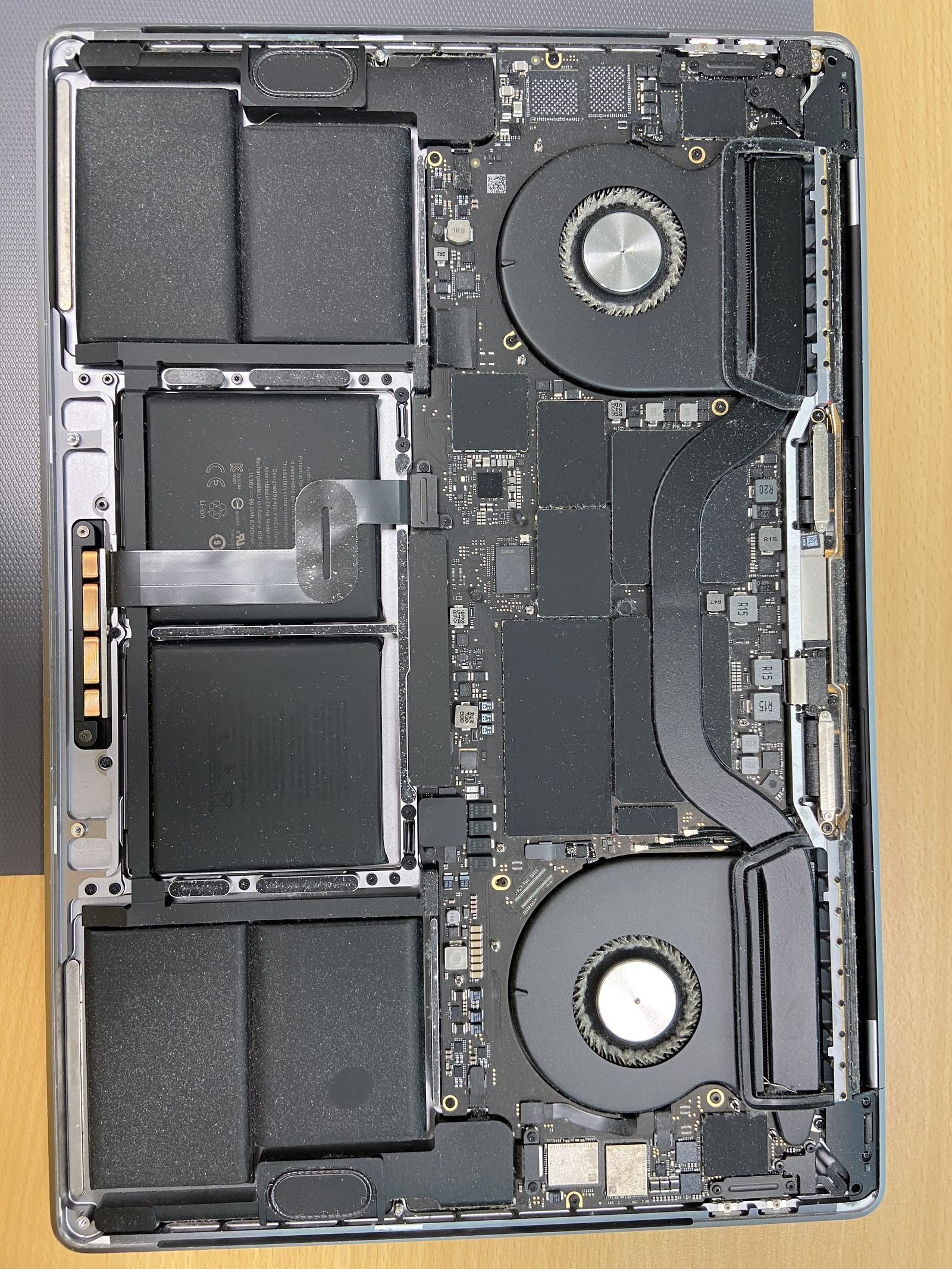
How to Choose the Right Configuration for a MacBook?
Quick answer
We have repaired and upgraded Apple machines in Dubai since 2004 - 21+ years across the bench. The single most common regret we hear from customers is not "I should have bought AppleCare" but "I wish I had bought more RAM." On modern M-series MacBooks that mistake is permanent, so this guide is built around one rule: buy the right configuration up front, because you cannot fix it later.
The one thing that changes everything: M-series RAM and SSD are soldered
On every Apple Silicon MacBook (M1, M2, M3, M4, M5 and their Pro/Max variants), the RAM is fused into the chip package as "unified memory" and the SSD storage is soldered to the logic board. Neither can be upgraded after purchase. There is no slot, no door, no aftermarket fix. If you buy 8GB and need 16GB in year three, your only option is to sell the machine and buy a new one.
This is the opposite of the old Intel MacBooks (2010-2017), many of which had socketed RAM and removable 2.5" drives. We still do RAM upgrades and SSD upgrades on Intel MacBooks every week - but to be completely clear: M-series machines cannot be upgraded by anyone, including Apple. So the decisions below are forever.
How much RAM? (8 vs 16 vs 24/32)
RAM (unified memory) is where your apps and open files live while you work. Run out and macOS spills onto the SSD as "swap," which feels sluggish and slowly wears the soldered drive. Our recommendation in 2026:
- 8GB - we no longer recommend it for anyone keeping the machine 4+ years. It is fine for Safari, Mail, Word and Netflix today, but 2026 software is heavier and you will feel the squeeze by year two. Buy 8GB only if budget is absolute and the machine is a secondary device.
- 16GB - the correct default for almost everyone: students, office work, light photo editing, 20+ browser tabs, and casual coding. This is the sweet spot and the number we tell most customers to buy.
- 24GB / 32GB - for developers running Docker, VMs or large Xcode projects, photographers in Lightroom with big catalogues, and anyone doing 1080p/4K video. If you do this work daily, do not hesitate.
Because it is soldered, the RAM upgrade Apple charges at purchase (roughly AED 700-900 to go from 8→16GB) is genuinely the cheapest it will ever be. Skipping it to save a few hundred dirhams is the mistake that costs you a whole new MacBook later.
How much SSD storage? (256 vs 512 vs 1TB)
Storage is also soldered on M-series, so the same logic applies. There is a second catch: on the cheapest 256GB configurations of some M2/M3 models, Apple uses a single memory chip instead of two, which measurably slows SSD speeds. Stepping up to 512GB often restores full speed.
- 256GB - tight. After macOS and apps you have roughly 200GB usable. Workable if you live in iCloud/Google Drive and own few large files, but it fills fast.
- 512GB - the comfortable default for most people. Room for photos, a Windows install, and a healthy app library without constant housekeeping.
- 1TB+ - for creatives with video projects, large photo libraries, music production, or anyone who hates managing space.
Tip: external SSDs and cloud storage can offload media cheaply, so you can lean toward 512GB internal and use a fast USB-C drive for archives. But your operating system, apps and active projects must live on the soldered internal SSD - so do not under-buy assuming an external will save you.
Which chip tier? (M-base vs Pro vs Max)
Apple sells three tiers of each generation, and most buyers overpay here for power they never use.
- M-base (e.g. M4) - astonishingly capable. Handles everything short of sustained professional video and 3D work: web, office, coding, photo editing, casual 1080p video. This is the right chip for 90% of buyers.
- M Pro - more CPU and GPU cores plus more memory bandwidth. Worth it for software engineers compiling large projects, photographers, and people doing regular 4K video. Also unlocks higher RAM ceilings and more external displays.
- M Max - for full-time colourists, 8K video editors, 3D artists, and machine-learning work. If you are not sure you need it, you do not. The price jump is steep and most workloads never touch its ceiling.
One more thing buyers ask us constantly: is it worth jumping to the newest chip? See our honest take in MacBook Pro M4 vs M5: worth upgrading?
MacBook Air vs MacBook Pro
This is the most common fork in the road. The short version: the Air is fanless, thin, silent, lighter, and cheaper - perfect for students, writers, office work and travel. The Pro adds active cooling (so it sustains heavy workloads without throttling), a brighter ProMotion 120Hz display, more ports, and better speakers.
Rule of thumb: if your work comes in short bursts, buy the Air. If you push the chip hard for long stretches (video exports, big compiles), the Pro's fan keeps it fast. We break down every difference in MacBook Air vs MacBook Pro 2026.
What screen size?
Screen size is a portability-versus-workspace trade-off, not a power decision.
- 13"/14" - the everyday carry. Light, fits any bag, ideal for commuting around Dubai and working in cafes.
- 15"/16" - more desktop real estate for spreadsheets, code, and timelines, and bigger machines often pair with the higher chip tiers. Heavier, so think about whether you carry it daily.
Many of our customers buy the smaller laptop plus an external monitor at their desk - the best of both worlds.
Recommendations by use case
Here is how we actually advise customers who walk into our Dubai Media City workshop:
- Student - MacBook Air, M-base, 16GB RAM, 256-512GB SSD. Light, silent, lasts all day, and the 16GB keeps it usable through a full degree. Full picks in best MacBook for students Dubai 2026.
- Developer - MacBook Pro, M Pro, 24-32GB RAM, 512GB-1TB SSD. Containers, simulators and large builds eat memory. See best Mac for developers Dubai 2026.
- Creative pro - MacBook Pro, M Pro/Max, 32GB+ RAM, 1TB+ SSD, 16" display. Video, 3D and heavy Photoshop reward every spec. Details in best Mac for creative pros Dubai.
- Business / general office - MacBook Air, M-base, 16GB RAM, 512GB SSD. Reliable, portable, runs everything from Teams to spreadsheets without fuss, and the extra RAM future-proofs it for years.
New, refurbished, or trade-in?
You do not always need to buy new. A certified refurbished MacBook can be 15-25% cheaper for the same warranty-grade hardware - we walk through what to check in should I buy a refurbished MacBook in Dubai? And if you are replacing an older machine, we accept trade-ins - bring your old MacBook in and we will value it toward your next one.
Need a second opinion before you buy?
We are not a retailer, so our advice has no sales agenda - we just want you to buy the right machine so you never regret the config. Call us on 055 741 3706 or visit Office #45, 10th Floor, Concord Tower, Al Sufouh, Dubai Media City. And if your current MacBook just needs fixing rather than replacing, see MacBook repair Dubai.
Frequently asked questions
- No. On all M-series MacBooks (M1 through M5 and Pro/Max) the RAM is fused into the chip as unified memory and cannot be upgraded by anyone, including Apple. Only older Intel MacBooks (2017 and earlier) had upgradeable RAM. Buy enough up front.
- For light web, email and Netflix today, yes. But 2026 software is heavier and you will feel the limit within a couple of years, and you cannot upgrade later. For anyone keeping the machine 4+ years we recommend 16GB minimum.
- It is tight - about 200GB usable after macOS and apps. It works if you rely on iCloud or Google Drive and own few large files, but 512GB is the comfortable default. Note the soldered SSD cannot be upgraded on M-series machines.
- Most people do not. The base M-chip handles web, office, coding and photo editing easily. Choose M Pro for large code compiles, regular 4K video or pro photography, and M Max only for 8K video, heavy 3D or machine-learning work.
- Buy the Air for students, writers, office work and travel - it is lighter, silent and cheaper. Buy the Pro if you run heavy workloads for long stretches, because its fan prevents throttling, plus it has a brighter 120Hz display and more ports.
- Only on Intel MacBooks (2017 and earlier) - we do SSD upgrades on those every week. M-series MacBooks have soldered storage that cannot be changed by anyone. If you have an Intel model, see our SSD upgrade page.
- Certified refurbished can save 15-25% for warranty-grade hardware. Just confirm battery health, cycle count and that it is a genuine Apple or trusted-seller refurb. We cover the checks in our refurbished MacBook guide.
- Yes. We are a repair shop, not a retailer, so our advice is unbiased - we just want you to avoid the soldered-RAM regret. Call 055 741 3706 or visit our Dubai Media City workshop for a no-pressure second opinion.
Related on MacBook Repair Dubai
About the author
Shafiq is a founder & senior apple technician at MacBook Repair Dubai, Dubai's longest-running Apple-only repair workshop (since 2004). Personally signs the QC checklist on every job leaving the bench.