Problem solving · MacBook
Top 10 Common MacBook Problems and How to Fix Them
After 21 years on the bench in Dubai, we see the same ten MacBook faults again and again. Here's how to spot each one, what you can safely try yourself, and when it's time to let a technician take over.
Top 10 Common MacBook Problems and How to Fix Them?
Quick answer
We've repaired MacBooks in Dubai since 2004 - that's more than 21 years and tens of thousands of machines. In that time, roughly nine out of ten MacBooks that come through our Dubai Media City workshop fall into one of just ten problem categories. Below we walk through each, with the symptoms, a safe DIY check you can do at home, and an honest note on when it's cheaper and safer to bring it in. Diagnosis is always free, and we offer free pickup across Dubai mainland.
1. MacBook won't turn on (no chime, no display)
Symptoms: Pressing power does nothing, no Apple logo, no fan spin, or a black screen even though you can hear it running.
DIY check: Plug in the original charger and leave it 15-20 minutes - a deeply drained battery can take time to wake. Then force-restart: on Apple Silicon, hold the power button 10 seconds; on Intel, try an SMC reset (Shift+Control+Option+power for 10 seconds). Watch the charger cable/brick LED - if there's no light, the issue may be the charger, not the Mac. Listen carefully for a faint chime or fan.
When to service: If there's still no life, or you get a black screen with backlight, it's usually a power-delivery fault on the logic board or a failed charging circuit. This is bench work - we run a free diagnostic and most no-power faults trace to the logic board (component-level repair from AED 800) or the charging port. See our full guide on MacBook not turning on.
2. Battery draining fast or not charging
Symptoms: Battery dies in an hour, "Service Recommended" warning, sudden shutdowns at 30-40%, or no charge despite a green-light charger.
DIY check: Apple menu → System Settings → Battery → Battery Health and note the maximum capacity and "cycle count". Below 80% capacity, or a "Service Recommended" flag, means the cell is worn. Also check Battery settings for which apps are using significant energy in the background. See our battery health check guide.
When to service: Worn cells don't recover - and a swelling battery (trackpad lifting, case bulging) is a safety risk that needs immediate attention. Our MacBook battery replacement starts at AED 450 with a 90-day warranty. If it charges erratically but the battery is healthy, the fault is often the charging port.
3. Screen flicker, lines, or dim bands (flexgate)
Symptoms: Horizontal lines, flickering, a "stage light" effect at the bottom of the screen, or a backlight that dies when you open the lid past a certain angle. The last two are classic "flexgate" on 2016-2017 13" MacBook Pros.
DIY check: Connect an external monitor. If the external display is perfectly clean, the logic board and GPU are fine and the fault is in the display panel or its flex cable. If the external monitor also shows artefacts, it points to the GPU.
When to service: Cracked panels, flexgate cables and dead backlights are all display-assembly work. Our MacBook screen repair starts from AED 600. Dubai's heat and dust can accelerate flex-cable wear, so don't ignore early flicker.
4. Overheating and loud, constant fans
Symptoms: Bottom case too hot to touch, fans roaring during light tasks, the cursor stuttering, or thermal shutdowns. In Dubai's climate this is the single most common complaint we hear.
DIY check: Open Activity Monitor (Applications → Utilities) and sort by CPU. If "kernel_task" is pinned near 100%, the Mac is throttling to manage heat. Use it on a hard, flat surface (never a bed or sofa that blocks vents), and make sure no runaway app or browser tab is hammering the CPU.
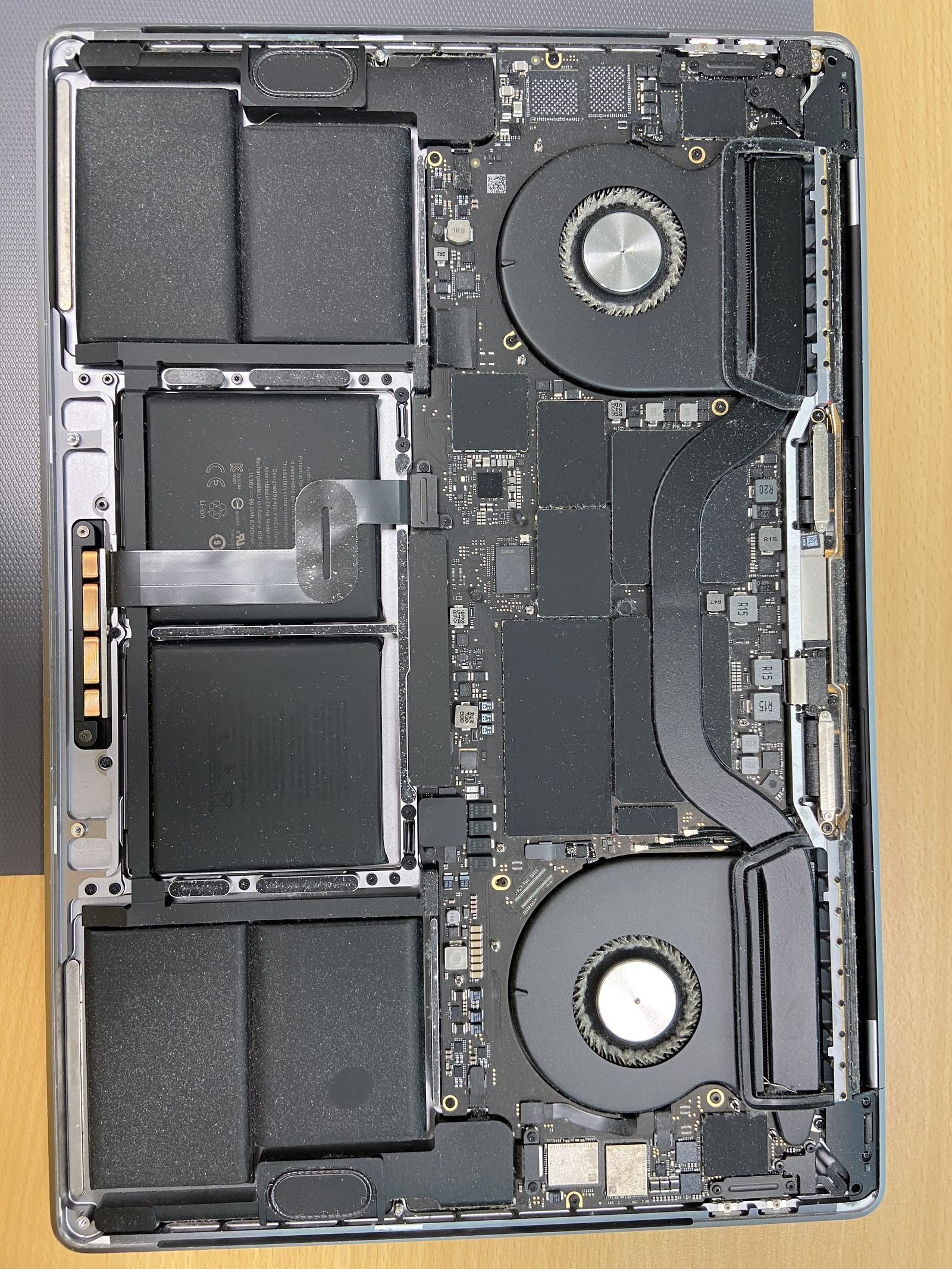
When to service: After a few years in Dubai, fan blades and heatsink fins clog with fine dust, and the thermal paste dries out. Our fan and thermal cleaning service is AED 200 and usually restores normal temperatures and silent fans the same day.
5. MacBook running slow
Symptoms: Beach-ball spinning, apps slow to launch, laggy typing, long boot times.
DIY check: Keep at least 15% of your SSD free (macOS uses it as swap). Empty Downloads and Trash, audit Login Items (System Settings → General → Login Items), close excess browser tabs, and run a free Malwarebytes scan for hidden adware. Our 10 fixes for a slow MacBook covers the full checklist.
When to service: If it's still slow after the software checks, the cause is usually adware, a worn battery throttling the chip, or - on Intel Macs - a tired hard drive. We offer virus and adware removal for AED 200 and SSD upgrades from AED 700 that transform older Intel MacBooks.
6. Keyboard keys sticking, repeating, or dead
Symptoms: Keys that repeat characters, feel mushy, register twice, or don't respond - common on 2015-2019 butterfly-keyboard models.
DIY check: Hold the MacBook at 75 degrees and blow compressed air across the affected keys in a left-to-right sweep - this clears dust and crumbs that jam the butterfly mechanism. Restart to rule out a software glitch, and test with the on-screen keyboard (Accessibility settings) to confirm whether it's hardware.
When to service: If cleaning doesn't fix it, the key mechanism or the keyboard's flex membrane has failed. Our MacBook keyboard repair starts at AED 350. If the trackpad has also gone unresponsive, see our trackpad repair (from AED 350).
7. Water or liquid damage
Symptoms: A spill - coffee, water, juice - followed by no power, sticky keys, screen issues, or intermittent faults that appear days later as corrosion spreads.
DIY check: Immediately power off (hold power 10 seconds), unplug the charger, do NOT try to turn it on to "test" it, and do NOT use rice. Turn it upside down in a tent shape to drain, and bring it in as fast as possible. The clock is against you: corrosion on the logic board is what kills a wet MacBook, not the liquid itself.
When to service: Same day, ideally within hours. We perform ultrasonic cleaning and corrosion treatment before damage spreads. Water damage repair starts at AED 700, with free diagnosis and a no-fix-no-charge ethos on the diagnostic itself.
8. Wi-Fi and Bluetooth dropping out
Symptoms: Wi-Fi disconnects randomly, won't see networks, slow speeds on a fast line, or Bluetooth mouse/keyboard/headphones stuttering.
DIY check: Restart your router and the Mac. Remove and re-add the network (System Settings → Wi-Fi → Details → Forget, then rejoin). Reset NVRAM on Intel Macs. Try a different 5GHz vs 2.4GHz band. Crucially, test whether other devices on the same network are fine - if only the Mac struggles, it's the Mac.
When to service: If software resets don't help, the Wi-Fi/Bluetooth antenna (often routed through the display hinge) or the wireless module on the logic board may be faulty. Bring it in for a free diagnostic; antenna and logic board level repairs start at AED 800.
9. Storage almost full
Symptoms: "Your disk is almost full" warnings, can't save files, can't update macOS, and everything slows to a crawl.
DIY check: Apple menu → System Settings → General → Storage. Use the recommendations to offload to iCloud, empty Trash, delete old iOS device backups, clear Downloads, and remove large unused apps. Aim to keep at least 15% free at all times.
When to service: If you've genuinely outgrown the drive, an Intel MacBook can be upgraded to a larger, faster SSD - SSD upgrades start from AED 700. On Apple Silicon the storage is soldered and can't be enlarged, so iCloud or an external drive is the answer. If the drive itself is failing, ask about our full diagnostic (free) and data recovery from AED 400.
10. Kernel panics and random restarts
Symptoms: The Mac suddenly restarts showing "Your computer restarted because of a problem", repeated freezes, or shutdowns under load.
DIY check: Boot into Safe Mode (Apple Silicon: hold power, choose your disk while holding Shift; Intel: hold Shift at startup) - if it's stable there, a third- party app or login item is the culprit, so remove recently installed software. Run Apple Diagnostics (hold D, or power button → Options on Apple Silicon) to flag failing hardware. Make sure macOS is fully updated.
When to service: If panics persist in Safe Mode or Apple Diagnostics returns a hardware code, it's typically RAM, a failing SSD, or a logic-board fault. Our full diagnostic is free; on older Intel models a logic board repair (from AED 800) or RAM upgrade (Intel only, from AED 400) often resolves it.
Still stuck? We'll diagnose it free
If your MacBook problem isn't on this list, or the DIY checks didn't help, bring it to our workshop at Office #45, 10th Floor, Concord Tower, Al Sufouh, Dubai Media City, or call us on 055 741 3706. We're open Monday to Saturday, 9am-10pm, offer free pickup across Dubai mainland, free diagnosis on every repair, and back our work with a 90-day warranty. You can also see our full MacBook repair services or get in touch.
Frequently asked questions
- Overheating and loud fans, by a wide margin. Dubai's heat and fine dust clog the fans and heatsink and dry out the thermal paste, causing the chip to throttle. A professional fan and thermal cleaning is AED 200 and usually fixes it the same day.
- Diagnosis is always free. The repair depends on the cause - a charging port or charging circuit fault is at the lower end, while component-level logic board repair starts at AED 800. We tell you the exact price after the free diagnostic, before any work begins.
- Often yes, if you act fast. Power it off immediately, don't try to turn it on, skip the rice myth, and bring it in within hours. We do ultrasonic cleaning and corrosion treatment. Water damage repair starts at AED 700, with free diagnosis first.
- Almost always worth replacing. A battery replacement from AED 450 with a 90-day warranty restores full runtime and removes the performance throttling that worn cells cause - far cheaper than a new MacBook for a machine that's otherwise fine.
- Connect an external monitor: if it's clean, the fault is the display panel or its flex cable (including the 'flexgate' fault on 2016-2017 13" Pros); if the external also shows artefacts, it's the GPU. Screen repair starts from AED 600.
- On Intel MacBooks, yes - SSD upgrades start from AED 700 and RAM upgrades from AED 400. On Apple Silicon (M1 and later) both the SSD and RAM are soldered to the chip and cannot be upgraded, so iCloud or an external drive is the workaround.
- Yes. We offer free pickup across Dubai mainland, free diagnosis on every repair, and a 90-day warranty on the work we do. We're open Monday to Saturday, 9am-10pm, in Dubai Media City.
- Start with Safe Mode and an external monitor. If a fault disappears in Safe Mode it's software; if an external display is clean, the internal screen is the hardware issue. Apple Diagnostics (hold D or D on startup) flags failing hardware. Our full diagnostic is free if you'd rather we check.
Related on MacBook Repair Dubai
About the author
Shafiq is a founder & senior apple technician at MacBook Repair Dubai, Dubai's longest-running Apple-only repair workshop (since 2004). Personally signs the QC checklist on every job leaving the bench.